Engagement context
I was engaged by a mid-sized Australian financial services firm — confidential under NDA, referenced here as "the client" — to automate a set of back-office workflows that had grown by accretion over several years: invoice processing, data entry between the firm's ERP and several adjacent line-of-business systems, recurring report generation for internal and regulatory audiences, and multi-step approval routing on anything touching client financial records. None of it was technically complex work. All of it was manual, repetitive, and error-prone at volume — the kind of workload that gets solved by hiring another analyst rather than by re-engineering the process. Because the domain was financial records and client information handling, the brief carried a constraint most RPA engagements don't: every workflow touching client data needed an explicit, auditable decision trail, and nothing with financial consequence could be fully hands-off. The six-month engagement scope was to design and ship a sustainable automation layer across the highest-volume workflows, at a cost profile the firm could run indefinitely without a dedicated automation team.
The win
"I designed a two-layer automation architecture rather than a single RPA bot farm. Power Automate handled the deterministic steps — moving data between systems, populating forms, assembling reports — because that's what RPA tooling is actually good at, and it's cheap and stable to run. Where a workflow required judgment — is this invoice anomalous, does this data mismatch need escalation, is this approval routine or does it need a second look — I put an LLM-orchestrated agentic layer in front of it, with confidence-gated decisions and a human-in-the-loop approval step wherever the call carried financial or client-data risk. The architectural discipline was knowing which steps belonged in which layer, and never letting the agentic layer make an unsupervised call on anything irreversible. Six months in: nine workflows automated, manual effort down ~35%, and 1.5 FTE of analyst time freed for higher-value work — with a full audit trail on every decision the system made or escalated."
Workflow discovery: separating the deterministic from the judgment-based
The first three weeks were discovery, not automation. I ran the existing workflows with the team who owned them, mapping each one into two categories: steps that follow a fixed rule every time — copy this field, populate this template, route to this named approver — and steps that require judgment — does this line item look wrong, is this the right approver for this exception, should this report flag an anomaly. Most teams jump straight to "automate the whole process" and end up with an RPA bot that silently mis-handles the 5% of cases that don't fit the happy path. Separating the two categories upfront is what makes the rest of the architecture correct.
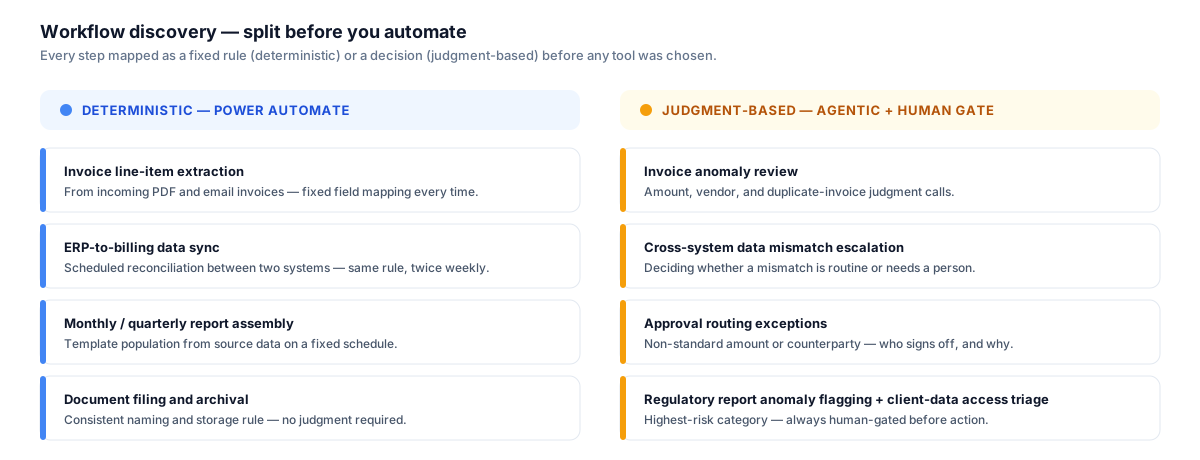
Nine workflows split cleanly into two categories once mapped against "is this a fixed rule or a judgment call?" — the split, not the tooling, is what determined the architecture.
Discovery output: nine workflows, two categories
Deterministic — routed to Power Automate
- Invoice line-item extraction from incoming PDFs/emails
- ERP-to-billing system data sync
- Monthly and quarterly report assembly from source data
- Document filing and records archival
Judgment-based — routed to the agentic layer, human-gated
- Invoice anomaly review (amount, vendor, duplicate detection)
- Cross-system data mismatch escalation
- Approval routing exceptions (non-standard amount or counterparty)
- Regulatory report anomaly flagging before submission
- Client-data access request triage
Deterministic layer: Power Automate for invoice processing and ERP data entry
For the four deterministic workflows, I built the automation in Power Automate — the firm already held Microsoft 365 licensing that included it, which meant no new procurement cycle, and it integrated natively with SharePoint document libraries and the Dataverse layer the ERP connector used. Invoice processing extracts line items from incoming PDF and email invoices using Power Automate's AI Builder document-extraction model, validates the extracted fields against a rules table (vendor exists in master data, amount within expected range, no duplicate invoice number), and either posts directly to the ERP or drops into the exception queue. The ERP-to-billing sync runs on a scheduled trigger, reconciling records between the ERP and the adjacent billing system that previously required an analyst to manually cross-check spreadsheets twice a week. I considered UiPath for this layer too — it has the stronger desktop-automation surface for legacy Windows applications — but the client's systems were browser- and API-accessible, so Power Automate's lower licensing and hosting overhead won on running cost without giving up capability.
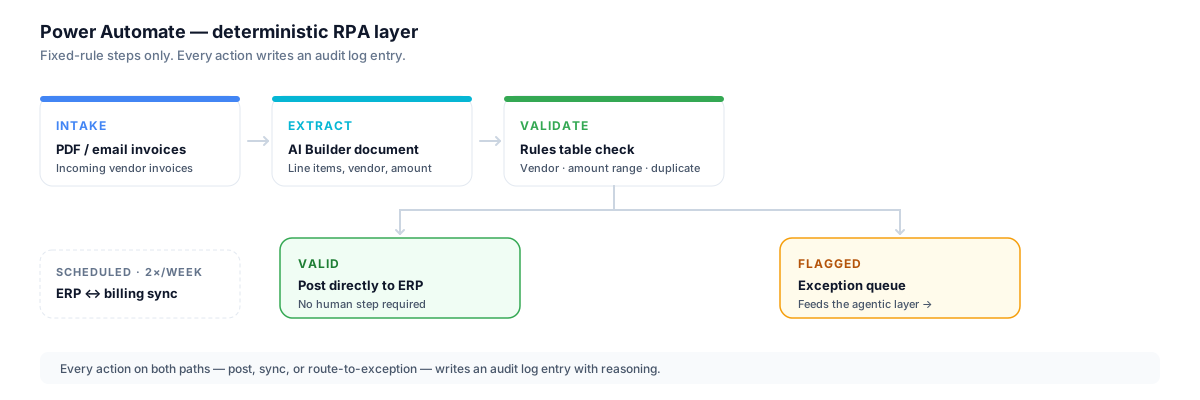
Every automated action — post, sync, or route-to-exception — writes an audit log entry. In a financial-records workflow, "it ran successfully" isn't sufficient; you need to be able to show exactly what it did and why.
Agentic layer: LLM-orchestrated gates with human-in-the-loop approval
The five judgment-based workflows are where the engagement's real design work sat. I built an LLM-orchestrated agentic layer — invoices and data flagged by the deterministic layer's validation rules, plus approval-routing and report-review workflows, feed into a set of agent stages that each produce a confidence-scored recommendation rather than an autonomous action. An invoice flagged as a possible duplicate gets an LLM-generated explanation of why it was flagged and a recommended action (approve, reject, escalate), but the action itself is never taken without a human confirming it at the gate. The gating threshold is deliberately conservative: anything touching client financial records or an approval outside the standard amount band routes to a named human approver by default, and the agent's role is to make that person's review faster — surfacing the relevant context, the anomaly reasoning, and the recommended action — not to replace their sign-off.
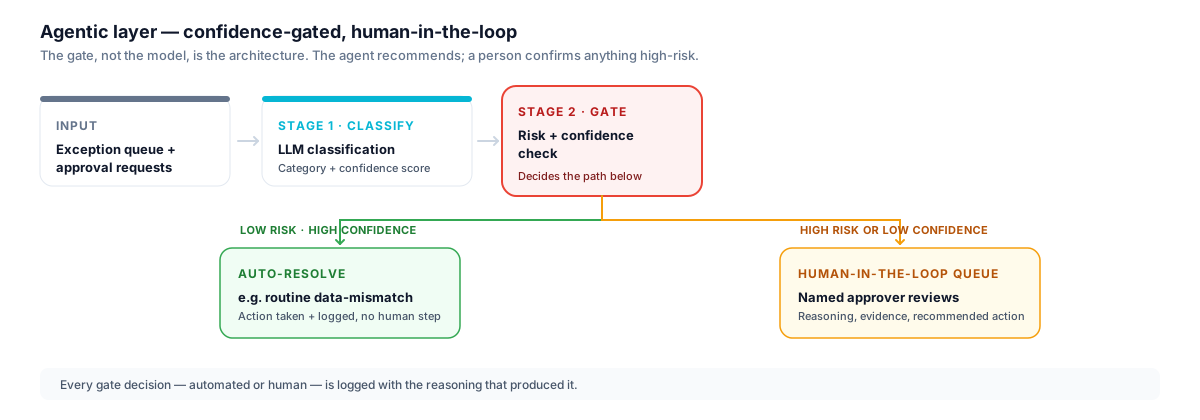
The gate, not the model, is the architecture. Confidence and risk category decide whether a case is auto-resolved or handed to a human — and the threshold for "hand to a human" was set deliberately conservative given the domain.
Agentic gate logic
Stage 1: Classify
- LLM reads the flagged case (invoice, data mismatch, approval request)
- Produces a category, a confidence score, and a plain-language reasoning summary
Stage 2: Gate
- Low risk + high confidence (e.g. routine data-mismatch correction) → auto-resolve, action logged
- High risk OR low confidence (e.g. anomalous invoice, non-standard approval, client-data access) → human-in-the-loop queue
Stage 3: Human review (gated cases only)
- Named approver sees reasoning, evidence, and recommended action
- Approver confirms, overrides, or requests more context — decision and rationale logged
Audit trail
- Every gate decision — automated or human — is logged with the reasoning that produced it
Report generation sat across both layers. The deterministic layer assembled the monthly and quarterly reports from source data on schedule — the mechanical part. The agentic layer reviewed the assembled report against an anomaly rubric before it went to the regulatory or internal audience, flagging anything that looked like a data quality issue or an outlier worth a second look, with the same human-gate pattern applied before submission. This caught two data-source misalignments during the engagement that would previously have gone out in a report and been caught later, if at all.
Outcome: cost and headcount impact
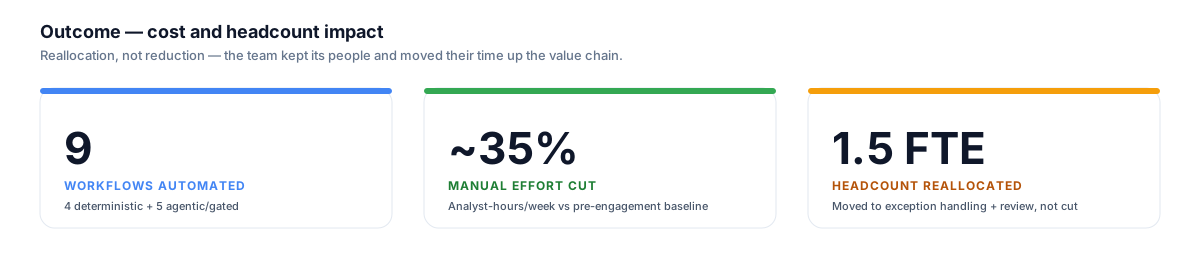
The headcount outcome was reallocation, not reduction — the team kept its people and moved their time from typing data into exception handling and review, which is a better use of a trained analyst.
Manual processing effort across the nine automated workflows dropped by roughly 35% against the pre-engagement baseline, measured in analyst-hours per week on those specific tasks. That freed approximately 1.5 FTE of analyst capacity, which the client reallocated — not cut — into exception handling, human-gate review, and reconciliation work that the automation surfaced but didn't (and shouldn't) resolve unsupervised. The cost profile was deliberately kept low: Power Automate ran on licensing the firm already held, the agentic layer used a cost-tiered model selection (a cheaper model for classification, escalating to a more capable model only on low-confidence or high-risk cases), and the whole system required no dedicated automation engineer to keep running post-handover — the client's existing IT team owns maintenance.
For the general framework behind this engagement — how to split deterministic from judgment-based steps, where Power Automate and UiPath fit versus an agentic layer, and where the human-in-the-loop gate belongs — see AI Workflow Automation: A Practical Guide.
What I'd do differently
The gating thresholds were tuned conservatively at launch, which was the right call for a financial-records domain, but it meant the human-in-the-loop queue ran heavier than necessary in the first few weeks — a number of low-risk cases that could have auto-resolved were routed to a human anyway because the initial risk-category rules were coarse. I recalibrated the categories against four weeks of gated-decision data (which cases the human approved without changes vs overrode), which tightened the auto-resolve band without loosening it on anything that mattered. I'd build that recalibration checkpoint into Week 3 as a planned step now, rather than treating it as a mid-engagement adjustment.
The second change: I'd define the audit-log schema jointly with the client's compliance function before building the first workflow, not after the third. The early workflows logged what I judged relevant; compliance later asked for two additional fields (approver role at time of decision, and the specific data fields the LLM's recommendation was based on) that required a schema migration and a re-run of historical exports. Cheap to fix early, more disruptive once workflows were already in production.
Architectural patterns I now apply
-
Split deterministic from judgment before choosing tools. The discovery phase — mapping every step as "fixed rule" or "requires judgment" — determines the architecture before any tool gets picked. Skipping this step is how teams end up with an RPA bot that silently mishandles the cases it was never designed to judge.
-
RPA tooling for RPA problems. Power Automate or UiPath for the deterministic layer, chosen on integration surface and running cost, not on which tool is fashionable. An LLM should not be doing string-matching and field population that a rules table already does correctly and cheaply.
-
Confidence-gated agentic decisions, never unsupervised on irreversible actions. The agentic layer's output is a recommendation with a confidence score, not an executed action, whenever the case is high-risk or low-confidence. The threshold for "route to a human" is set by domain risk, not by model confidence alone.
-
Cost-tiered model selection. A cheaper, faster model handles first-pass classification; escalation to a more capable model is reserved for low-confidence or high-risk cases. This is what keeps an agentic layer affordable to run indefinitely rather than a one-off pilot cost.
-
Reallocation as the headcount story, not reduction. Automating a workflow frees capacity; what the client does with that capacity is a business decision, not an engineering one. Framing the automation outcome around reallocation to higher-value work — exception handling, review, reconciliation — kept the engagement aligned with the team rather than positioned against it.
Engagement summary
| Field | Detail |
|---|---|
| Duration | Dec 2025 – May 2026 · 6 months |
| Sector | Financial Services (confidential, NDA) |
| Role | Automation Architect / Engineering Lead |
| Workflows automated | 9 (4 deterministic, 5 agentic/gated) |
| Stack | Power Automate, Azure OpenAI, LangGraph, ERP + SharePoint integration |
Reference
Anonymised under client NDA. Reference available on request at screen stage.
Related services