Problem class — when this pattern applies
Mobile surfaces attract second-class testing citizenship: they are tested manually, or with a flimsy device-lab script that runs on one emulator and never reaches CI. The result is a regression gap that makes every mobile release a manual endurance event.
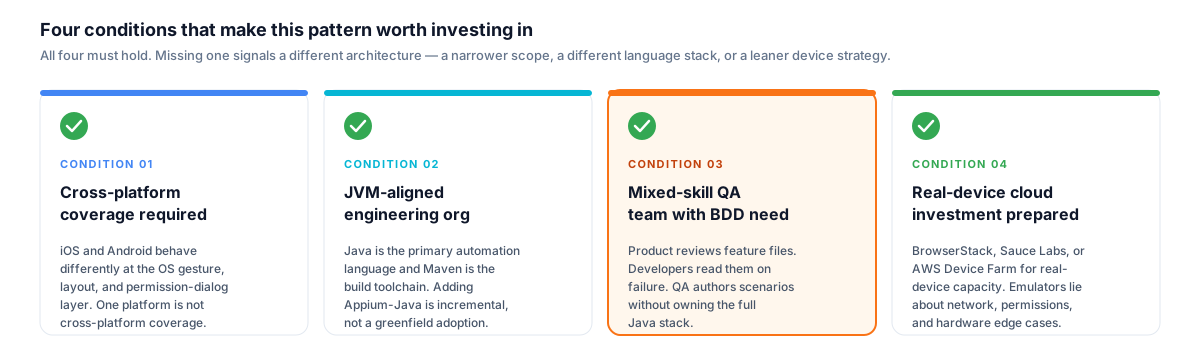
All four conditions must hold. Missing one signals a different architecture — a narrower scope, a different language stack, or a leaner device strategy — not a gap to paper over with configuration.
The conditions that make this pattern worth investing in are specific. First, a genuine cross-platform coverage requirement — iOS and Android behave differently at the OS gesture layer, at the font-scaling and layout engine level, and at the keyboard and permission-dialog layer. A single-platform suite is not cross-platform coverage; it is a sampling strategy that will miss the bugs users actually file. Second, a JVM-aligned engineering organisation where Java is the primary automation language and the build toolchain already runs on Maven — adding an Appium-Java layer is incremental, not a greenfield adoption. Third, a mixed-skill QA team where BDD genuinely reduces the authoring gap: Gherkin steps are a communication contract between QA, Product, and Development, not a cosmetic layer over the test code. Where the whole team reads and edits feature files, BDD earns its overhead. Fourth, an organisation prepared to invest in real-device coverage via a cloud device farm rather than relying on simulator-or-emulator-only results — because simulators lie about network conditions, system dialogs, and permission flows in ways that emulators compound rather than correct.
I have applied this architecture in polyglot product organisations running multiple parallel Agile streams across different mobile verticals, and in SaaS product contexts where the mobile client was a first-class delivery surface with continuous feature velocity. In both cases the driver was the same: the mobile test surface needed to be treated as a peer to the web and API layers, not an afterthought.
Architecture / design decisions
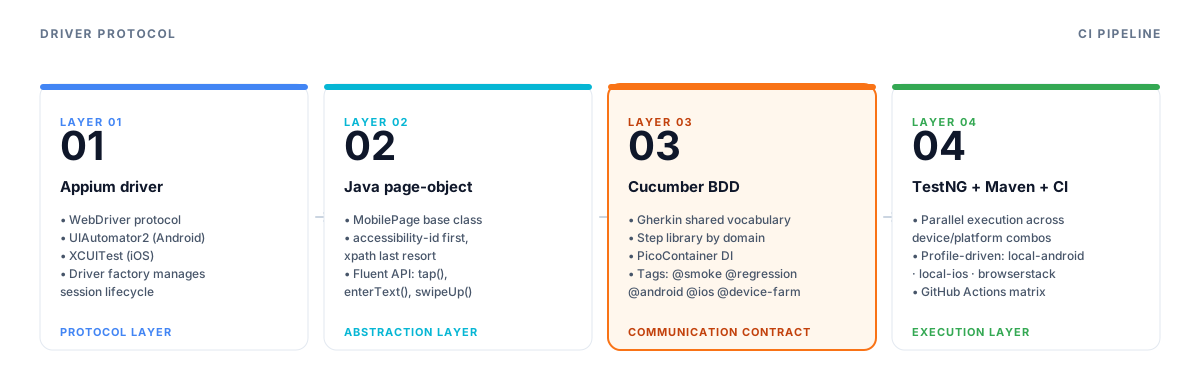
Each layer has one responsibility. The driver layer speaks WebDriver protocol; the page-object layer abstracts platform differences; the BDD layer is the communication contract with non-engineering stakeholders; the execution layer handles parallelism and CI routing.
Architecture at a glance — Appium + Java + Cucumber
Appium driver layer
- WebDriver protocol over UIAutomator2 (Android) + XCUITest (iOS)
- Session lifecycle managed in a base driver factory; capabilities injected from profile config
- Local emulator · physical device · BrowserStack/Sauce Labs/AWS Device Farm all supported via same factory interface
Java page-object layer
- Mobile pages extend a base
MobilePageclass wrapping Appium'sAppiumDriver - Locator strategy: accessibility-id first, xpath fallback — explicit hierarchy, no implicit fallback surprises
- Fluent action API (
tap,enterText,swipeUp,waitForVisible) makes step definitions readable
Cucumber BDD layer
- Gherkin feature files are the shared vocabulary across QA, Product, and Dev
- Step library reuses across feature files; no per-feature step duplication
- Tag taxonomy:
@smoke·@regression·@android·@ios·@device-farm
TestNG runner + Maven build
- Parallel execution across device/platform combinations via TestNG's
parallel="tests"config - Surefire plugin publishes JUnit-compatible XML; reports aggregate in CI
- Profile-driven capabilities:
local-android·local-ios·browserstackvia Maven-Pflag
Cloud device farm + CI
- BrowserStack Automate (or Sauce Labs / AWS Device Farm) provides the real-device capacity envelope
- Credentials injected via environment variables; never in the repository
- GitHub Actions matrix across
{android, ios}×{device tier}with artefact upload on failure
Appium driver layer: WebDriver protocol over UIAutomator2 and XCUITest
Appium implements the WebDriver protocol over native platform automation engines: UIAutomator2 on Android and XCUITest on iOS. The architectural implication is that Appium is not writing its own automation layer — it delegates to the platform's own UI testing engine and exposes the result through a standard WebDriver HTTP interface. That is why the same Java WebDriver client can drive an iOS app and an Android app without platform-specific branching in the test code; the branching lives in the capabilities, not in the assertions.
Session lifecycle is the first architectural decision. I manage it in a driver factory class rather than in the test base directly. The factory reads a capabilities profile — injected as a Maven profile or a CI environment variable — and returns an initialised AppiumDriver instance. The test code never constructs the driver directly; it asks the factory. This means swapping from a local emulator run to a BrowserStack real-device run is a profile switch, not a code change. The factory pattern also handles session teardown consistently, which matters because orphaned Appium sessions on a cloud device farm accumulate cost.
Java + page-object + screenplay pattern: mobile pages as typed contracts
Mobile page objects differ from web page objects in one structurally important way: there is no DOM. Locator strategies on mobile are: accessibility id (the accessibilityIdentifier on iOS, the contentDescription on Android), id (resource-id on Android), xpath, class name, and platform-specific strategies. The hierarchy I enforce is accessibility-id first, then resource-id, then xpath as a last resort.
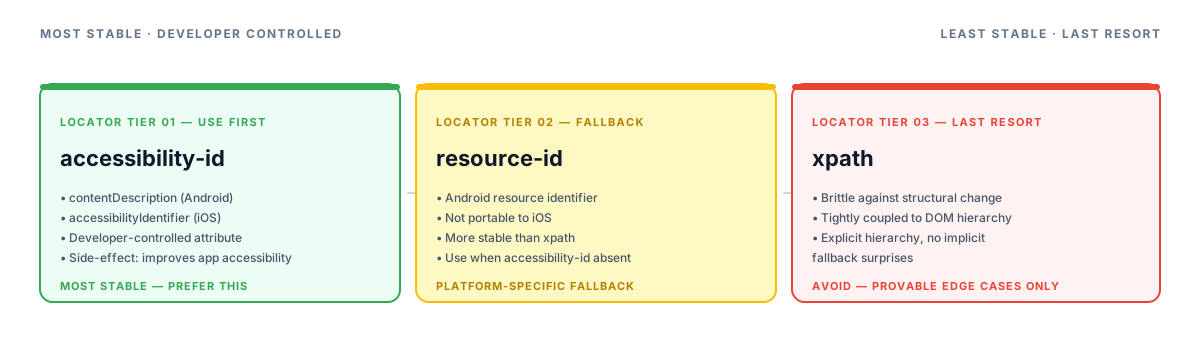
The locator hierarchy is explicit and non-negotiable. Preferring accessibility-id is not just a stability decision — encouraging the development team to add accessibility attributes for automation has a direct co-investment benefit for the app's real-world accessibility.
Accessibility-id is the most stable locator because it maps to an attribute the developer controls explicitly — and encouraging its use in automation has a side effect of improving the app's actual accessibility, which is a worthwhile co-investment.
The fluent action API wraps Appium's raw findElement + click + sendKeys into named business-level operations: tap(), enterText(), swipeUp(), longPress(), waitForVisible(). Step definitions read at the business level — "the user enters their credentials and taps Sign In" — not at the raw driver level. This is the part of the Screenplay pattern I carry into mobile: the interaction layer abstracts the mechanism, the step library describes the behaviour.
Cucumber feature layer: Gherkin as a shared vocabulary
The Cucumber feature layer exists to serve one purpose: making the test suite readable to people who do not write Java.
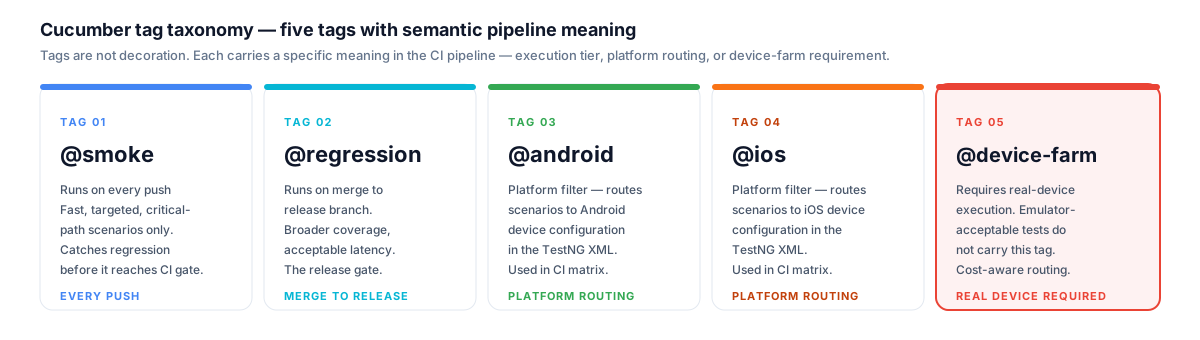
Tags are the routing layer between test intent and CI execution. The taxonomy makes the execution strategy explicit in the feature file — any QA engineer reading a scenario knows exactly when it runs and what infrastructure it requires.
Product owners review feature files in pull requests. Developers read them when a scenario fails. QA analysts write new scenarios without needing to understand the page-object layer below. When those three things are actually happening, BDD is earning its overhead. When feature files are generated from test code after the fact, BDD is not being used — it is being performed.
The step library is organised by domain, not by feature. Steps for authentication, navigation, form interaction, and assertion are each in a separate step definition class. Step definitions are stateless; any shared state between Given/When/Then steps passes through a scenario context object injected via Cucumber's PicoContainer dependency injection. This avoids static state, which is the most common cause of parallelism failures in Cucumber-based suites.
The tag taxonomy carries semantic meaning in the pipeline. @smoke runs on every push; @regression runs on merge to the release branch; @android and @ios are platform filters used in the TestNG XML to route scenarios to the right device configuration; @device-farm marks scenarios that require real-device execution rather than emulator-acceptable.
TestNG runner + Maven build: parallel execution and profile-driven config
TestNG's parallel execution model maps well to mobile automation: each test can target a different device configuration, and the parallelism is across those configurations rather than across threads within a single test. The testng.xml defines multiple <test> blocks — one per platform/device combination — and the runner distributes them in parallel up to the configured thread ceiling.
Maven profiles handle the capabilities switch cleanly. A local-android profile points the factory at a running emulator with Android capabilities; a browserstack profile injects BrowserStack hub URL, credentials, and device-specific desired capabilities from environment variables. The same mvn test -P browserstack command that runs in CI runs locally once the developer has exported the right environment variables — no code change, no properties file to maintain per environment.
Surefire publishes JUnit-compatible XML at the end of each parallel execution leg. In GitHub Actions, the publish-test-results action or the equivalent aggregates those XML artefacts into a single test summary visible on the run.
Cloud device farm: real devices, not emulator faith
Emulators and simulators are useful for fast feedback during development — they start quickly, they are free, they cover the majority of functional behaviour. They are not trustworthy for three categories of failure: system-level permission dialogs (camera, location, push notification — the OS varies how these behave across device generations), network condition handling (real carrier network behaviour under degraded signal is not emulatable), and hardware-specific layout issues on edge-case screen densities and aspect ratios.
Cloud device farms — BrowserStack Automate, Sauce Real Device Cloud, AWS Device Farm — provide a capacity envelope of real devices on demand, with parallel session limits configurable to match the pipeline budget. The architectural decision is not which cloud farm to use; it is to treat the device matrix as a first-class configuration artifact. I maintain a device matrix document listing the tier-1 and tier-2 devices for both platforms, the OS versions in scope, and which Cucumber tag routes to which tier. The device matrix drives the TestNG XML; the TestNG XML drives the CI matrix. Changing the supported device set is a configuration change, not a code change.
CI integration: GitHub Actions matrix
The pipeline runs a matrix across {platform: [android, ios]} with each leg targeting the configured device tier.
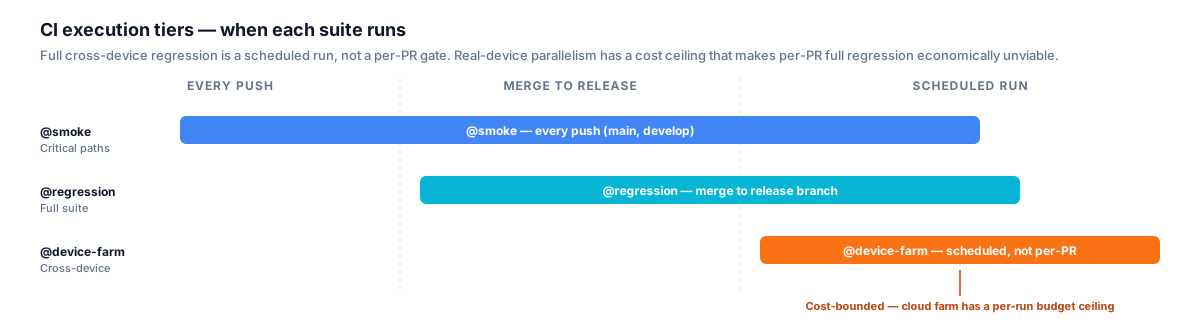
Full cross-device regression is scheduled, not per-PR. Real-device cloud capacity costs money per parallel session — the gate strategy matches the execution scope to the economic ceiling, not the other way around.
Credentials for the cloud device farm are injected as Actions secrets. On failure, each leg uploads its artefacts — Appium server log, screenshots, and video — before the job terminates. The artefacts are the primary triage tool: a failing scenario with its Appium log and a screen recording is a self-contained bug report.
The execution tiers follow the same principle as any other test gate: @smoke on every push (fast, targeted, catches critical-path regressions); @regression on merge to the release branch (broader coverage, acceptable latency). Full cross-device regression is a scheduled run, not a per-PR gate, because real-device parallelism on a cloud farm has a cost ceiling that makes per-PR full regression economically unviable.
Code snippets
Java page-object — accessibility-id locator + fluent action
// src/test/java/com/example/mobile/pages/LoginPage.java
public class LoginPage extends MobilePage {

    private static final By EMAIL_FIELD    = MobileBy.AccessibilityId("login-email-input");
    private static final By PASSWORD_FIELD = MobileBy.AccessibilityId("login-password-input");
    private static final By SIGN_IN_BUTTON = MobileBy.AccessibilityId("login-sign-in-button");
    private static final By ERROR_BANNER   = MobileBy.AccessibilityId("login-error-banner");

    public LoginPage(AppiumDriver driver) {
        super(driver);
    }

    public LoginPage enterEmail(String email) {
        tap(EMAIL_FIELD).enterText(EMAIL_FIELD, email);
        return this;
    }

    public LoginPage enterPassword(String password) {
        tap(PASSWORD_FIELD).enterText(PASSWORD_FIELD, password);
        return this;
    }

    public HomePage signIn() {
        tap(SIGN_IN_BUTTON);
        return new HomePage(driver);
    }

    public String errorMessage() {
        return waitForVisible(ERROR_BANNER).getText();
    }
}
Cucumber feature file — tagged scenario
@smoke @android @ios
Feature: User authentication

  @regression
  Scenario: Successful sign-in with valid credentials
    Given the app is launched on the login screen
    When the user enters valid credentials
    And taps the sign in button
    Then the home screen is displayed

  @smoke
  Scenario: Invalid password shows an error message
    Given the app is launched on the login screen
    When the user enters an incorrect password
    And taps the sign in button
    Then an authentication error message is displayed
GitHub Actions — parallel iOS + Android matrix with device-farm credential injection
# .github/workflows/mobile-regression.yml
name: Mobile regression

on:
  push:
    branches: [main, develop]

jobs:
  mobile-tests:
    runs-on: ubuntu-latest
    strategy:
      fail-fast: false
      matrix:
        platform: [android, ios]
    steps:
      - uses: actions/checkout@v4

      - uses: actions/setup-java@v4
        with:
          java-version: '17'
          distribution: temurin
          cache: maven

      - name: Run ${{ matrix.platform }} regression
        env:
          BROWSERSTACK_USERNAME: ${{ secrets.BROWSERSTACK_USERNAME }}
          BROWSERSTACK_ACCESS_KEY: ${{ secrets.BROWSERSTACK_ACCESS_KEY }}
        run: |
          mvn test \
            -P browserstack \
            -Dplatform=${{ matrix.platform }} \
            -Dcucumber.filter.tags="@regression and @${{ matrix.platform }}" \
            --no-transfer-progress

      - name: Upload failure artefacts
        if: failure()
        uses: actions/upload-artifact@v4
        with:
          name: mobile-test-artefacts-${{ matrix.platform }}
          path: |
            target/surefire-reports/
            target/screenshots/
            appium-server.log
          retention-days: 7
When I'd brief this
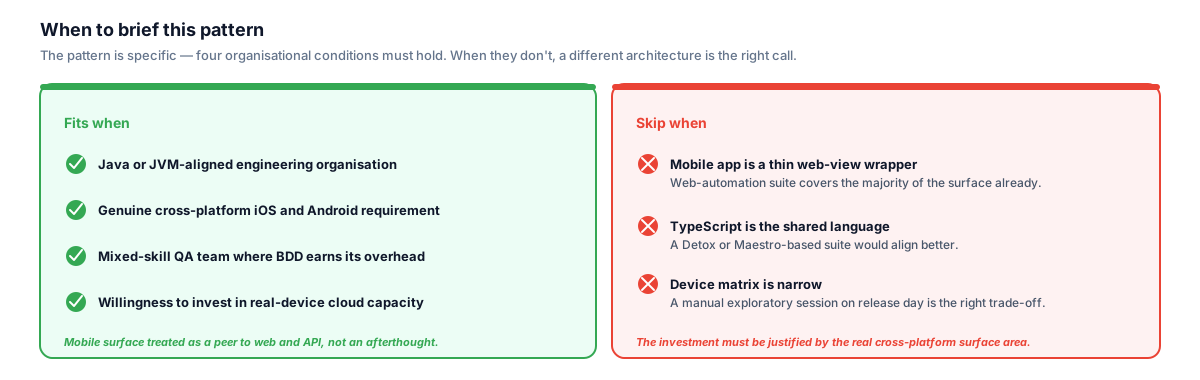
The pattern is specific. The wrong fit is a TypeScript-first organisation with a thin web-view mobile client — where a Detox or Maestro suite would align with the existing toolchain and the cross-platform surface area doesn't justify the investment.
This pattern fits four organisational conditions. First, a Java or JVM-aligned engineering organisation — the Java/Maven build chain is already present, and adding an Appium-Java layer is incremental rather than a second language ecosystem. Second, a genuine cross-platform iOS and Android coverage requirement where simulator-only results have already produced mobile-specific production bugs that a real-device suite would have caught. Third, a mixed-skill QA team where BDD is genuinely useful as a communication contract — Product reviews feature files, Developers read them on failure, and QA authors new scenarios without owning the full Java stack. Where those three things are happening, BDD earns its overhead; where they are not, it is overhead without a return. Fourth, a willingness to invest in real-device cloud capacity via BrowserStack, Sauce Labs, or AWS Device Farm rather than accepting the blind spots that emulator-only suites carry into production. Mobile was one of the 21+ test disciplines I owned or directed across the government and enterprise programmes covered in the Enterprise QA Leadership — 6-Year Multi-Programme Tenure; this pattern is the discipline-specific deep-dive into how that mobile automation surface was architected.
The pattern is not the right fit for teams where the mobile app is a thin wrapper around a web view and the web-automation suite covers the majority of the surface; for organisations where TypeScript is the shared language and a Detox or Maestro-based suite would align better with the existing toolchain; or where the device matrix is narrow enough that a manual exploratory session on release day is genuinely the right trade-off for the team size.