Problem statement
Enterprise programmes accumulate performance testing investment over years — test plans, workload models, distributed runner infrastructure, and a team that knows how to operate them. A well-run JMeter estate is not legacy; it is institutional knowledge encoded in XML. The brief that lands on the desk of a QE Architect in this context is not "replace JMeter" — it is "get JMeter into CI, wire the results into observability, and make the programme's perf gate defensible to stakeholders."
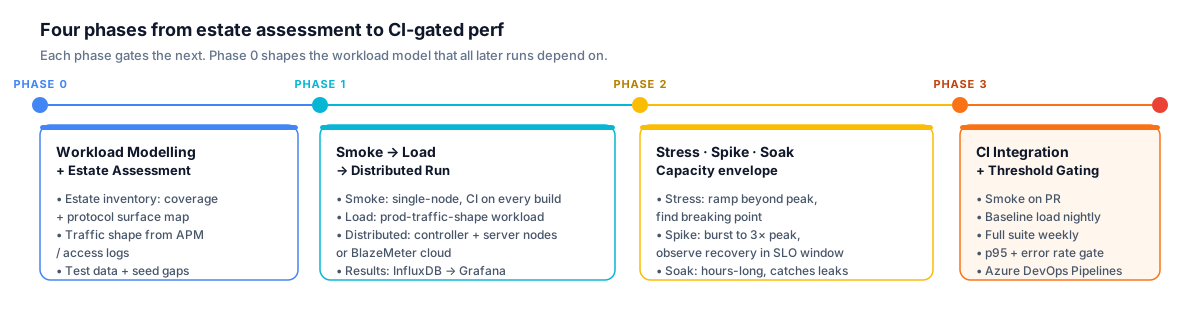
Phase 0 is the most load-bearing investment in the engagement. The workload model it produces determines whether every subsequent test run produces meaningful results or merely comforting ones.
The other brief is cross-protocol. Government SI, banking, and regulated-enterprise programmes commonly have a workload surface that spans HTTP APIs, JDBC database calls, JMS messaging queues, and LDAP authentication flows — sometimes in the same end-to-end scenario. Tools that only speak HTTP cannot exercise the full surface. JMeter's native support for HTTP, JDBC, JMS, LDAP, and a dozen other protocols in a single test plan is its architectural advantage over code-first alternatives. For these workloads, choosing a different tool is not a modernisation; it is a capability reduction. The SaaS Launch Performance Programme case study shows this pattern applied in practice: JMeter covered the mixed-protocol surface — JDBC direct calls, JMS messaging hops, LDAP auth flows — while a parallel k6 layer handled the HTTP engineering gate, preserving the existing JMeter estate rather than replacing it.
Before designing the test architecture I ask the questions that shape the right approach: What is the protocol surface — pure HTTP API, or mixed-protocol with DB-direct or messaging hops? What does the existing JMeter estate look like — a handful of regression scripts, or a mature distributed-runner setup? What is the observability stack — Dynatrace, Datadog, AppDynamics, something else? And the hardest question — what is the workload model based on? Flat synthetic load that hits every endpoint equally is a trap; it misses production bottlenecks that only appear under realistic traffic shape.
Reference architecture
Phase 0: Workload Modelling + Estate Assessment
Estate inventory
- Existing JMeter scripts: coverage · protocol surface
- Protocol surface map: HTTP + JDBC + JMS + LDAP identified
Production traffic shape
- Extracted from APM / access logs
- Per-endpoint request frequency · time-of-day patterns · user mix
Test data
- Per-tenant seed data, load-test isolation gaps identified
Phase 1: Smoke → Load → Distributed Run
Execution tiers
- Smoke test: single-node JMeter; handful of threads; CI on every build
- Load test: production-traffic-shape workload; threshold gates defined
- Distributed run: JMeter controller + server nodes, or BlazeMeter cloud
- Single-JVM ceiling at a few thousand threads; distributed cluster pushes to tens of thousands
Reporting
- Results: InfluxDB listener → Grafana dashboard per run
Phase 2: Stress · Spike · Soak
Stress
- Ramp beyond expected peak to identify breaking point
- Yields capacity envelope + scale-out trigger thresholds for ops
Spike
- Burst to 3× peak in seconds; observe recovery within SLO window
Soak
- Sustained load over hours; catches connection-pool + memory leaks
Phase 3: CI Integration + Threshold Gating
Azure DevOps pipeline — tiered execution
- Smoke on PR (fast feedback, catastrophic-regression catch only)
- Baseline load nightly on main branch
- Full suite (stress + spike + soak) weekly
Gating + observability
- Threshold-based gate: p95 latency + error rate; pipeline fails on miss
- Historical trend in Grafana: p95 drift detection across builds
Design decisions
Cross-protocol test plan structure
JMeter's primary architectural advantage is a single test plan that coordinates multiple protocol samplers. For a programme with a mixed surface — HTTP API front, JMS messaging middle, JDBC database-direct operations — the test plan organises into Thread Groups per user type, each with the sampler mix that matches how that user type actually traverses the stack. An HTTP-only tool cannot exercise the JMS hop; that hop may be exactly where the SLA bottleneck lives under load.
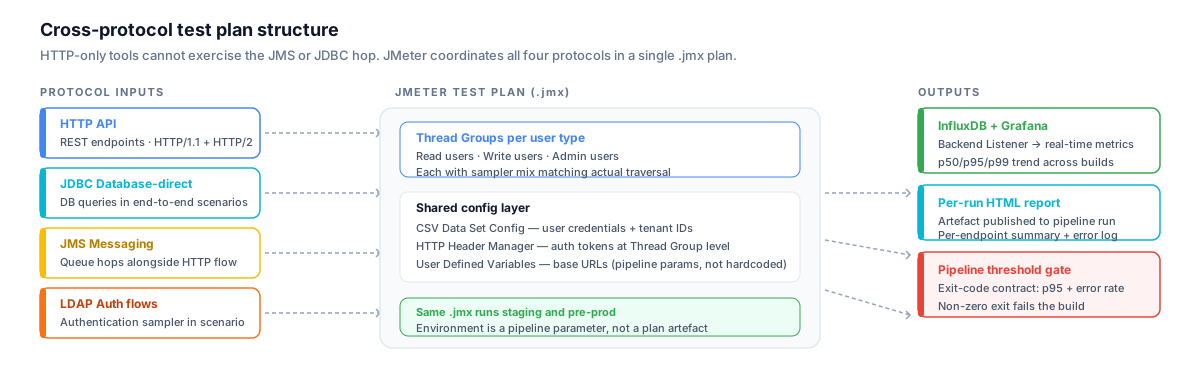
The config that changes per environment lives in variables, not hardcoded in samplers. The same .jmx runs against staging and pre-prod — environment is a pipeline parameter, not a plan artefact.
I structure JMeter plans with a shared config layer — CSV Data Set Config for parameterised user credentials and tenant data, HTTP Header Manager for auth tokens at the Thread Group level, and a User Defined Variables block for environment-specific base URLs. The structural rule: config that changes per environment lives in variables, never hardcoded in samplers. This means the same .jmx file runs against staging and pre-prod without modification — environment is a pipeline parameter, not a plan artefact.
Distributed execution: controller + server nodes vs BlazeMeter cloud
Single-JVM JMeter has a practical thread ceiling — beyond a few thousand concurrent threads the JVM begins introducing coordination overhead that distorts results. For enterprise programmes with high-concurrency targets I use distributed mode: a JMeter Controller orchestrates multiple JMeter Server nodes; each server independently executes the test plan and sends results back to the controller for aggregation. For programmes where spinning up and maintaining server nodes is operationally undesirable, BlazeMeter provides the same distributed capability as a cloud service with JMeter plan upload and result streaming.
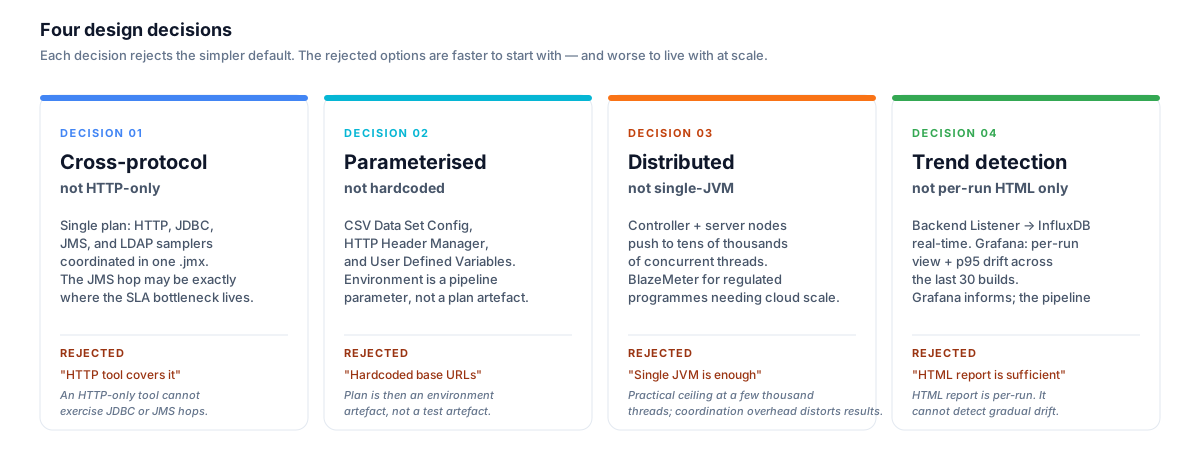
Each rejected alternative is faster to start with. The decisions above are the difference between a perf estate that compounds in value over years and one that produces comforting-looking numbers that miss production bottlenecks.
The trade-off is explicit: self-hosted distributed gives the programme full control over the runner environment and no per-VU cloud cost; BlazeMeter reduces operational overhead but introduces cost at scale and a dependency on an external service. For regulated programmes where all test execution must remain within a network boundary, self-hosted is the only option — worth establishing early.
Results aggregation: InfluxDB + Grafana
JMeter's built-in HTML report is a useful per-run artefact but does not support trend analysis. The pattern I use for programmes that need regression detection across builds: JMeter's Backend Listener emits per-sample metrics to InfluxDB in real-time during the test run. Grafana queries InfluxDB and surfaces a dashboard with per-endpoint p50/p95/p99 latency, throughput, and error rate, tagged by test-run-id and build number.
The result: a Grafana dashboard that answers two questions — "did this run pass its thresholds?" (per-run view) and "is p95 creeping up over the last 30 builds?" (trend view). Threshold gates in the pipeline check InfluxDB metrics at run completion; the build fails if a gate is missed. Grafana is informational; the pipeline gate is the hard block.
CI integration and threshold gating
The tiered execution model for JMeter in Azure DevOps:
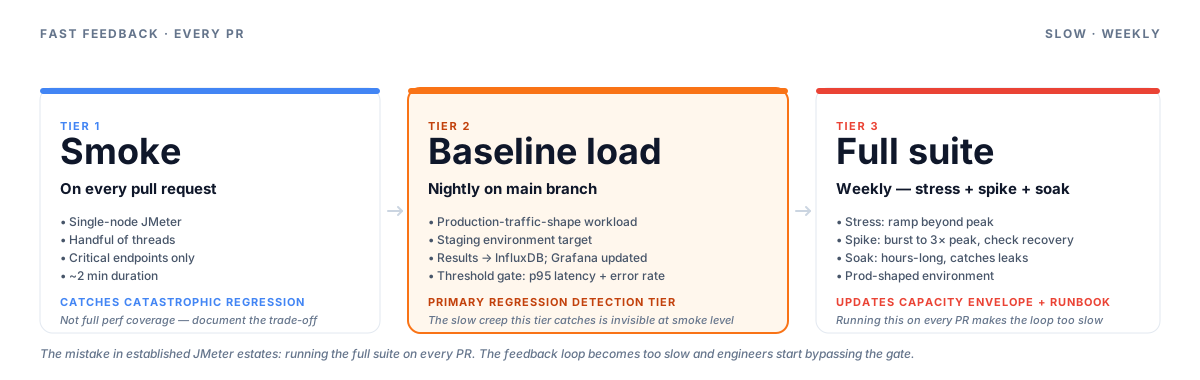
The tiered model is a deliberate trade-off: smoke on PR catches the catastrophic regression; the nightly and weekly tiers catch the subtle creep. Running the full suite on every PR makes the feedback loop too slow and engineers learn to bypass the gate.
- Smoke on PR: single-node JMeter, handful of threads, critical endpoints only, two-minute duration. Catches catastrophic regressions without blocking the PR queue.
- Baseline load nightly on main: production-traffic-shape workload against the staging environment. Results written to InfluxDB; Grafana dashboard updated.
- Full suite weekly: stress + spike + soak. Run against a prod-shape environment. Results used to update the capacity envelope and inform the ops runbook.
The mistake I have seen in established JMeter estates is running the full suite on every PR. The feedback loop becomes too slow and engineers start bypassing the gate. The tiered model is a deliberate trade-off: smoke on PR catches the catastrophic regression; the nightly and weekly tiers catch the subtle creep. Document the trade-off explicitly — the smoke tier is not full perf coverage.
Workload model fidelity
Flat synthetic workload — hitting every endpoint at equal rate — is the single most common mistake in long-running JMeter programmes. It produces results that look fine in the test lab and fail in production because production traffic is bursty and concentrated. At programme setup I extract the actual traffic shape from access logs or APM data: per-endpoint request frequency, time-of-day concentration, user-type distribution. That shape becomes the JMeter thread group and ramp configuration — not a guess.
The diagnostic pattern for a workload-fidelity gap: the programme's JMeter results say the system is healthy at target load; production has a degradation under burst traffic that the JMeter runs consistently miss. Check the workload model. Switching tools does not fix this; encoding the real traffic shape in the test plan does.
Code snippets
JMeter .jmx excerpt — parameterised HTTP test plan structure
<?xml version="1.0" encoding="UTF-8"?>
<jmeterTestPlan version="1.2" properties="5.0">
  <hashTree>
    <TestPlan guiclass="TestPlanGui" testclass="TestPlan" testname="API Load Test" enabled="true">
      <elementProp name="TestPlan.user_defined_variables" elementType="Arguments">
        <collectionProp name="Arguments.arguments">
          <elementProp name="BASE_URL" elementType="Argument">
            <stringProp name="Argument.name">BASE_URL</stringProp>
            <stringProp name="Argument.value">${__P(baseUrl,https://staging.example.internal)}</stringProp>
          </elementProp>
          <elementProp name="THREADS" elementType="Argument">
            <stringProp name="Argument.name">THREADS</stringProp>
            <stringProp name="Argument.value">${__P(threads,50)}</stringProp>
          </elementProp>
          <elementProp name="RAMP_SECONDS" elementType="Argument">
            <stringProp name="Argument.name">RAMP_SECONDS</stringProp>
            <stringProp name="Argument.value">${__P(rampSeconds,60)}</stringProp>
          </elementProp>
        </collectionProp>
      </elementProp>
    </TestPlan>
    <hashTree>
      <!-- Thread group: authenticated read-heavy users (majority of workload mix) -->
      <ThreadGroup guiclass="ThreadGroupGui" testclass="ThreadGroup"
                   testname="Read Users" enabled="true">
        <stringProp name="ThreadGroup.num_threads">${THREADS}</stringProp>
        <stringProp name="ThreadGroup.ramp_time">${RAMP_SECONDS}</stringProp>
        <boolProp name="ThreadGroup.same_user_on_next_iteration">true</boolProp>
      </ThreadGroup>
      <hashTree>
        <!-- CSV data set: per-user credentials and tenant IDs from seed data -->
        <CSVDataSet guiclass="TestBeanGUI" testclass="CSVDataSet" testname="User Data" enabled="true">
          <stringProp name="filename">test-data/users.csv</stringProp>
          <stringProp name="variableNames">USERNAME,PASSWORD,TENANT_ID</stringProp>
          <boolProp name="recycle">true</boolProp>
          <boolProp name="stopThread">false</boolProp>
          <stringProp name="shareMode">shareMode.all</stringProp>
        </CSVDataSet>
        <!-- Auth + sampler chain follows in full plan -->
      </hashTree>
    </hashTree>
  </hashTree>
</jmeterTestPlan>
Azure DevOps pipeline — tiered JMeter execution with threshold gating
# azure-pipelines-perf.yml
trigger:
  branches:
    include: [main, develop]

variables:
  JMETER_VERSION: '5.6.3'
  BASE_URL: $(STAGING_BASE_URL)
  INFLUXDB_URL: $(INFLUXDB_URL)

stages:
  - stage: PerfSmoke
    displayName: Smoke — PR fast feedback
    condition: eq(variables['Build.Reason'], 'PullRequest')
    jobs:
      - job: Smoke
        pool:
          vmImage: ubuntu-latest
        steps:
          - script: |
              docker run --rm \
                -v $(Build.SourcesDirectory)/perf:/tests \
                justb4/jmeter:$(JMETER_VERSION) \
                -n -t /tests/smoke.jmx \
                -Jthreads=5 -JrampSeconds=10 -JbaseUrl=$(BASE_URL) \
                -l /tests/results/smoke.jtl \
                -e -o /tests/results/smoke-report
            displayName: Run smoke JMeter test
          - script: |
              # Exit non-zero if error rate exceeds threshold
              python3 perf/scripts/check_thresholds.py \
                --jtl perf/results/smoke.jtl \
                --max-error-rate 0.5
            displayName: Check smoke thresholds

  - stage: PerfBaseline
    displayName: Baseline load — nightly
    condition: and(eq(variables['Build.Reason'], 'Schedule'), eq(variables['Build.SourceBranchName'], 'main'))
    jobs:
      - job: BaselineLoad
        pool:
          vmImage: ubuntu-latest
        steps:
          - script: |
              docker run --rm \
                -v $(Build.SourcesDirectory)/perf:/tests \
                justb4/jmeter:$(JMETER_VERSION) \
                -n -t /tests/load.jmx \
                -Jthreads=200 -JrampSeconds=120 -JbaseUrl=$(BASE_URL) \
                -JinfluxUrl=$(INFLUXDB_URL) \
                -l /tests/results/load.jtl \
                -e -o /tests/results/load-report
            displayName: Run baseline load test
          - script: |
              python3 perf/scripts/check_thresholds.py \
                --jtl perf/results/load.jtl \
                --max-error-rate 0.1 \
                --p95-latency-ms 500
            displayName: Check load thresholds (p95 + error rate)
          - task: PublishPipelineArtifact@1
            condition: always()
            inputs:
              targetPath: perf/results/load-report
              artifact: jmeter-load-report-$(Build.BuildId)
CI/CD integration
The pipeline above demonstrates the two-tier model in practice. The smoke stage runs on pull requests: a handful of threads, a short duration, critical endpoints only. The baseline load stage runs on a nightly schedule against main. A third stage — the full stress/spike/soak suite — runs on a weekly schedule and is not shown here to keep the snippet focused.
The threshold check script is intentionally a simple exit-code contract: it parses the JMeter .jtl results file, aggregates p95 latency and error rate, and exits non-zero if a threshold is breached. That exit code is all the pipeline needs to fail the build. The Grafana dashboard is a separate read path — it shows the trend without gating the pipeline on manual review.
The JMeter container approach (justb4/jmeter or equivalent) avoids installing a JVM + JMeter binary on the pipeline agent and makes the JMeter version a parameter rather than an assumption. For distributed runs, the controller and server nodes run as separate containers or VMs; the pipeline only needs to reach the controller. For an example of how this observability integration pattern extends into an AI-augmented pipeline — where APM correlation IDs link threshold failures directly to trace spans — see the AI-Augmented Playwright Test Pipeline case study.
Stack
| Tool | Role | Notes |
|---|---|---|
| JMeter | Load generation and test plan execution | 5.6.x; run via Docker container in CI |
| BlazeMeter | Cloud-based distributed execution | Optional; drop-in for self-hosted distributed nodes |
| InfluxDB | Real-time metrics store | JMeter Backend Listener → InfluxDB 2.x |
| Grafana | Trend dashboards and per-run views | Queries InfluxDB; informational, not the pipeline gate |
| Azure DevOps Pipelines | CI orchestration and threshold gating | Tiered: PR smoke · nightly baseline · weekly full suite |
When I'd brief this
This pattern fits when: the programme has an established JMeter estate worth preserving — test plans, distributed runner infrastructure, team familiarity; the workload surface is mixed-protocol (HTTP + JDBC + JMS + LDAP) where code-first HTTP-only tools cannot exercise the full surface; the procurement or regulatory profile requires a free / no-license-cost tool with a long vendor history; or the test authoring team leans toward GUI-driven scenario design rather than TypeScript code.
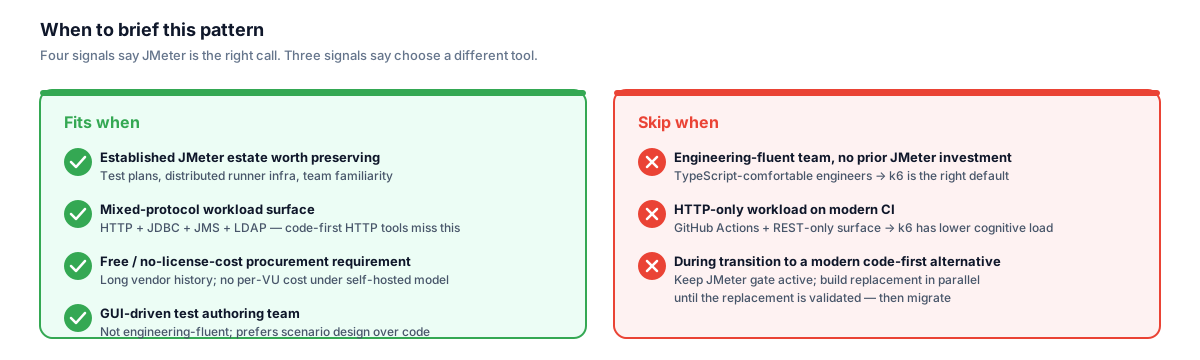
JMeter's value is context-dependent. The mixed-protocol surface and the established estate are the two signals that make it the right call rather than the path-of-least-resistance default.
Enterprise SI delivery programmes, government and regulated-industry engagements, and large multi-team programmes where some pods are not engineering-fluent are the typical context.
I have also briefed this pattern when an organisation is evaluating a migration to a modern code-first alternative and needs to maintain the JMeter gate during the transition — the same tiered CI model applies while the replacement is built and validated in parallel. For programmes without that established JMeter investment — engineering-fluent teams on an HTTP-dominant workload where k6's TypeScript-native model is a better fit — the k6 Performance Testing Pattern is the right starting point instead.