Problem class
This pattern applies when the programme has no pre-existing perf tooling investment and the team profile fits a code-first approach: engineers are comfortable in JavaScript or TypeScript, the workload surface is HTTP-dominant (REST APIs, WebSocket, gRPC), and CI/CD is already running on GitHub Actions or a comparable pipeline. It also fits when OSS-friendly procurement is a constraint — k6 is open-source with no per-VU license cost under the self-hosted model.
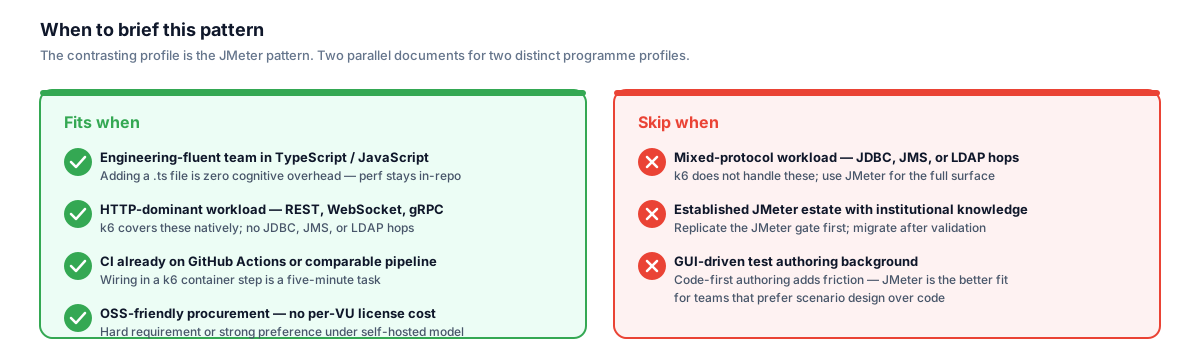
The contrasting profile — mixed-protocol surface or established JMeter investment — is covered by the parallel JMeter pattern document. These are two distinct programme profiles, not two maturity levels of the same approach.
The teams this pattern serves best are those where the perf authors and the functional-test authors are the same engineers. k6 scripts live in the same repository as the application and functional tests, follow the same TypeScript conventions, and gate the same pipelines. Perf becomes a first-class engineering discipline rather than a separate QA function operating on a different cadence.
The contrasting context — and the reason I keep the JMeter pattern as a parallel document — is when the workload surface is mixed-protocol (JDBC database-direct calls, JMS messaging hops, LDAP auth flows sitting alongside HTTP) or when there is an established JMeter estate with significant institutional knowledge encoded in existing test plans. In those contexts this pattern is the wrong starting point.
Architecture / design decisions
Tool selection: k6 vs JMeter vs Gatling vs Locust
The four tools I encounter most in this space each have a natural home. JMeter's home is cross-protocol enterprise workloads and GUI-driven authoring for teams without a strong developer background. Gatling's home is Scala-fluent organisations that want a type-safe DSL and strong HTML reporting out of the box. Locust's home is Python-fluent teams who want maximum flexibility and do not need to generate very high concurrency from a single runner. k6's home is engineering-fluent teams with a JavaScript or TypeScript codebase, CI-first culture, and a preference for lightweight tooling that does not require a separate orchestration UI.
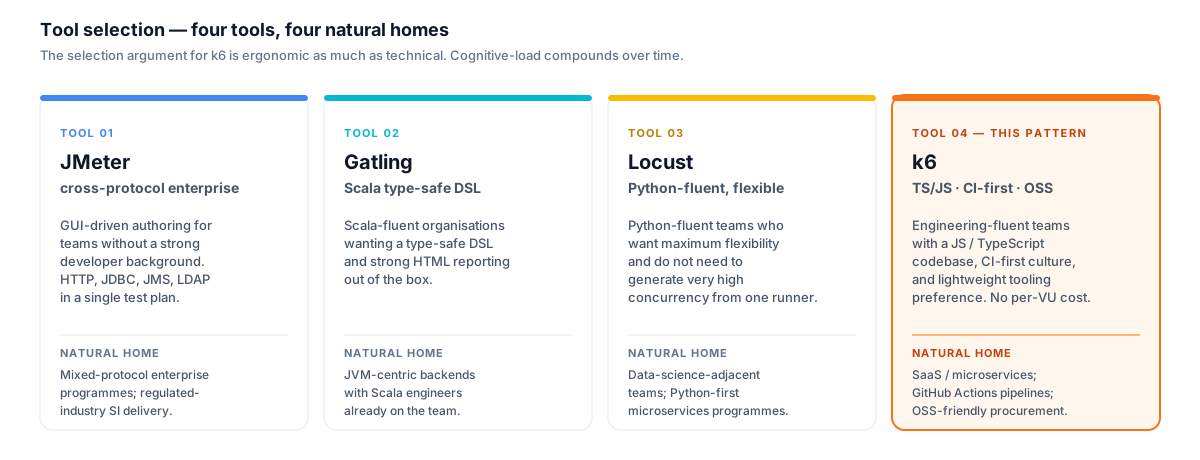
The selection argument for k6 is ergonomic as much as technical. If the same engineer writes TypeScript functional tests and deploys via GitHub Actions, adding a k6 scenario in the same language is zero cognitive overhead — and that compounds over the life of the programme.
The selection argument for k6 on a modern SaaS or microservices programme is ergonomic as much as technical: if the same engineer writes Playwright functional tests in TypeScript and deploys via GitHub Actions, the cognitive load of writing k6 scenarios in the same language and wiring them into the same pipeline is low. That low cognitive load compounds over time — engineers run the perf tests locally before pushing, they maintain the scripts alongside feature changes, and the test coverage does not drift from the application surface. The tools that require a separate GUI or a context switch to a different language make perf testing feel like a different team's job.
Protocol coverage is k6's acknowledged boundary. It handles HTTP/1.1, HTTP/2, WebSocket, and gRPC natively. It does not handle JDBC, JMS, or LDAP. For programmes where those protocols matter, the right answer is heterogeneous tooling — JMeter for the mixed-protocol slice, k6 for the HTTP slice — not forcing k6 across the full surface.
Workload modelling
Flat synthetic workload — every endpoint hit at equal rate with uniform concurrency — is the most common perf testing mistake I correct on new programmes. It produces results that look healthy in the test environment and miss real bottlenecks in production, because production traffic is bursty and concentrated on a small subset of high-frequency endpoints.
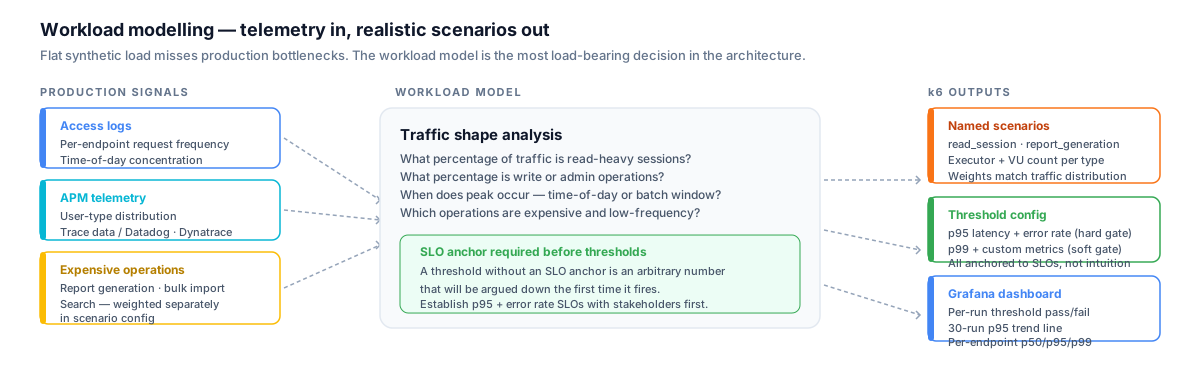
The workload model is the most load-bearing decision in the test architecture. Changing tools does not fix a fidelity gap here — encoding the real traffic shape in the scenario config does.
The discipline I apply from day one: extract the traffic shape from access logs, APM data, or application-level telemetry. What I want is per-endpoint request frequency, time-of-day concentration patterns, and user-type distribution. On a SaaS platform this might mean read-heavy authenticated sessions driving the majority of traffic, with a small subset of users triggering expensive report-generation or bulk-import operations at concentrated times. That shape becomes the k6 scenario configuration — not a guess.
The consequence of getting this right early is that the perf results actually represent production conditions. A bottleneck that only surfaces under the realistic traffic shape — a long-tail expensive operation called by a small percentage of users — is invisible under flat synthetic load. The workload model is the most load-bearing decision in the test architecture; changing tools does not fix a fidelity gap here.
Scenario design with k6 scenarios
k6's scenarios executor API is the structural mechanism for encoding the workload model. Rather than a single virtual-user pool ramping up and down, I define named scenarios that run concurrently — each scenario represents a user type, with its own VU count, ramp shape, and executor (constant arrival rate for sustained throughput, ramping arrival rate for ramp-up modelling, ramping VUs for simpler shapes).
The architectural benefit is that scenario weights can be tuned to match the traffic distribution pulled from production telemetry. A read-heavy scenario running at a sustained arrival rate, a write scenario at a lower rate, and a small administrative scenario with periodic bursts will produce a much more realistic load profile than a single thread group. Each scenario can also target a different set of endpoints, making the coverage explicit and independently threshold-gated.
Custom metrics within scenarios — Counter, Gauge, Rate, Trend — let me encode business-level signals beyond HTTP latency: successful report generations per minute, token-refresh failure rate, queue-depth-correlated latency. These surface on the Grafana dashboard alongside infrastructure metrics and give non-engineering stakeholders a perf story they can read without knowing what p95 means.
Threshold-based gating
k6's thresholds configuration is a first-class citizen of the test script, not a post-processing step. Thresholds are defined per metric — built-in metrics like http_req_duration and custom metrics alike — and k6 exits with a non-zero status code if any threshold is breached. That exit code is the pipeline gate. No separate threshold-check script or post-processing is needed.
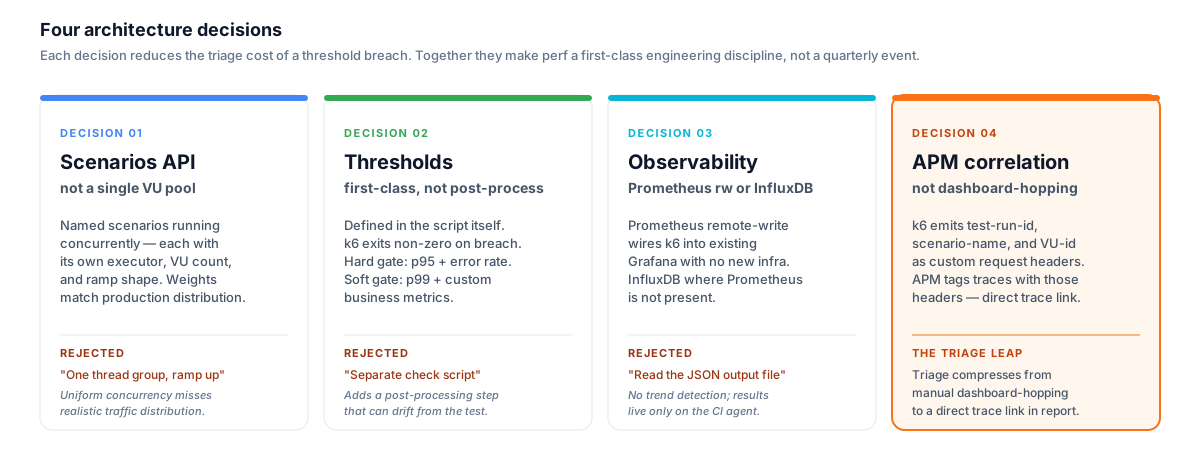
The APM correlation decision is the one that changes triage most meaningfully. Linking a failed threshold run directly to the APM trace compresses the root-cause step from a manual dashboard-hopping exercise to a single click.
The gate I design for most programmes follows a two-level model. A hard gate — p95 latency and error rate — fails the pipeline outright on breach and blocks merge or deployment. A soft gate — p99 and custom business metrics — records the breach to the result store and surfaces it as a warning in the Grafana dashboard without blocking the pipeline. The split is deliberate: hard gates protect the SLA; soft gates surface emerging regressions that need attention but do not justify a blocked deploy.
Threshold values should be anchored to SLOs, not chosen by intuition or defaulted to round numbers. If there is no documented SLO, the first task before writing a threshold is establishing one with the relevant stakeholder. A threshold without an SLO anchor is an arbitrary number that will be argued down the first time it fires.
Observability stack
For self-hosted programmes where Prometheus is already part of the observability stack, k6's --out experimental-prometheus-rw flag emits metrics via the Prometheus remote-write protocol. This wires k6 result data into existing Grafana dashboards with no additional infrastructure — the perf run becomes just another metric source in the same Grafana instance the team already uses. The Grafana dashboard I build for perf programmes shows per-run pass/fail per threshold, per-endpoint p50/p95/p99, error rate by status code, and a 30-run trend line for regression detection.
For programmes where Prometheus is not present or where result persistence across long time windows matters, the InfluxDB v2 output (--out influxdb) is the established alternative. The InfluxDB + Grafana combination has been the standard k6 observability stack for years and is well-documented — dashboards are available as Grafana community templates and the query model is mature.
APM correlation is the observability capability that changes the triage loop most meaningfully. When k6 emits custom request headers carrying test-run-id, scenario-name, and virtual-user-id, and the APM tool (Datadog, Dynatrace, Application Insights) is configured to ingest those tags, failed threshold runs can be linked directly to the APM trace for the failing requests. The triage step of "which request was slow, why, and where in the call chain did it slow down" compresses from a manual dashboard-hopping exercise to a direct trace link in the run report. The AI-Augmented Playwright Test Pipeline case study is a live deployment of this architecture — k6 running inside an AI-augmented pipeline with Dynatrace trace linking wired directly to threshold failure output.
CI integration model
The tiered execution model I use on GitHub Actions follows three tiers with distinct triggers:
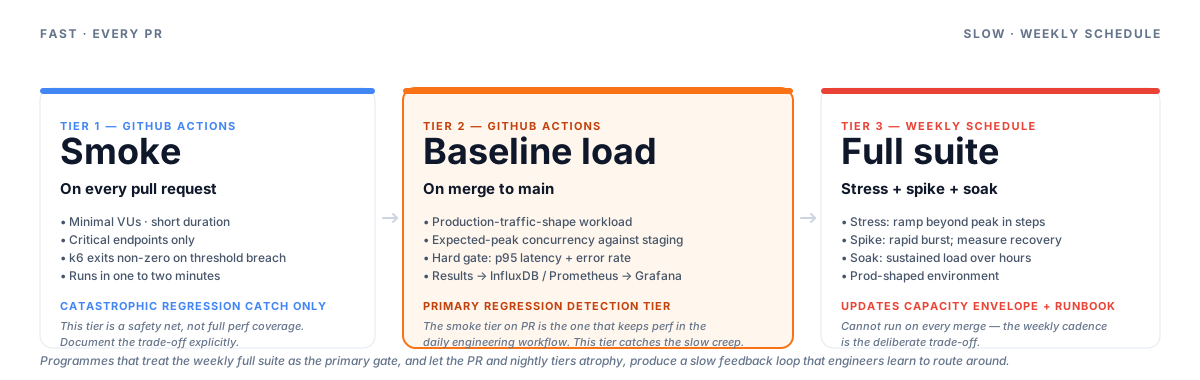
The smoke tier on PR is the one that keeps perf testing in the daily engineering workflow. Programmes that let the PR and nightly tiers atrophy — treating the weekly full suite as the primary gate — produce a feedback loop that engineers learn to route around.
Smoke on pull request — a handful of virtual users, a short duration, critical endpoints only. The smoke run catches catastrophic regressions (a deployed change that breaks the primary user journey under any load) without blocking the PR queue for longer than a minute or two. This tier does not represent full perf coverage; it is a safety net for the obvious failure.
Baseline load on merge to main — production-traffic-shape workload at expected peak, run against the staging environment. Results written to the observability store; Grafana trend updated. Hard threshold gates apply. This is the primary regression-detection tier.
Full suite on schedule — stress, spike, and soak runs on a weekly schedule against a prod-shaped environment. These tiers cannot run on every merge without making the feedback loop untenable; the weekly cadence is the deliberate trade-off. The output is the capacity envelope and the input to the ops runbook.
The mistake I have seen repeated in programmes that start with good intentions is treating the weekly full suite as the primary gate and letting the nightly and PR tiers atrophy. The result is a slow feedback loop that engineers learn to route around. The smoke tier on PR is the one that keeps perf testing in the engineering workflow daily. The SaaS Launch Performance Programme case study shows this tiered CI model in a real Azure DevOps deployment — k6 as the HTTP engineering gate on every PR, with JMeter handling the broader protocol surface on a nightly and scheduled cadence alongside it.
Architecture at a glance
Phase 0: Workload Modelling + Tool Decision
Tool selection filters (applied in order)
- Team fluency: TypeScript / JavaScript comfortable? → k6 earns the default
- Protocol surface: HTTP / WebSocket / gRPC only? → k6 covers it; mixed-protocol (JDBC/JMS/LDAP) → JMeter stays in play
- Observability stack: Prometheus / Grafana or Datadog / Dynatrace in place? → k6 correlation patterns are mature
Workload model inputs
- Per-endpoint request frequency from access logs or APM telemetry
- Time-of-day concentration patterns and user-type distribution
- Known expensive operations (report-gen, bulk import, search) weighted separately
- SLO anchors: p95 latency + error rate targets established before thresholds are written
Phase 1: Smoke → Load → Soak (k6 scenarios + thresholds)
Scenario architecture
- Named scenarios per user type: read-heavy session, write session, admin/background operations
- Executor selection: constant-arrival-rate for throughput targets; ramping-VUs for ramp-up modelling
- Custom metrics: per-business-event counters and rate metrics alongside HTTP latency
Execution tiers
- Smoke: minimal VUs · short duration · critical endpoints · PR trigger
- Load: production-traffic-shape · expected peak · nightly on main
- Soak: sustained expected load · hours-long run · weekly; catches connection-pool exhaustion and memory leaks
Threshold gating
- Hard gate: p95 latency + error rate → k6 non-zero exit → pipeline blocked
- Soft gate: p99 + custom business metrics → warning surfaced in Grafana, no pipeline block
- All threshold values anchored to documented SLOs, not round-number defaults
Phase 2: Stress · Spike (capacity envelope + recovery)
Stress
- Ramp beyond expected peak in steps; identify the first error wave and the sustained-capacity ceiling
- Output: capacity envelope document + scale-out trigger thresholds for the ops runbook
Spike
- Rapid burst to a multiple of expected peak; measure error rate during the spike and recovery time to baseline
- Pass criteria: error rate during spike bounded; system returns to SLO within the agreed recovery window
Run cadence
- Both tiers run on weekly schedule against a prod-shaped environment, not on every merge
- Output feeds the capacity model maintained in the engineering team's runbook
Phase 3: CI Integration + Threshold Gating
GitHub Actions — tiered execution
- Smoke on every PR (fast feedback; catastrophic-regression catch only)
- Baseline load on merge to main (primary regression gate; results to InfluxDB/Prometheus → Grafana)
- Full suite (stress + spike + soak) weekly on schedule
Observability integration
- k6 emits test-run-id, scenario-name, VU-id as custom request headers
- APM (Datadog / Dynatrace / Application Insights) tags traces with those headers
- Failed threshold runs link directly to the APM trace for root-cause attribution
- Grafana dashboard: per-run threshold pass/fail · per-endpoint p50/p95/p99 · 30-run trend
Code snippets
k6 — scenarios + thresholds skeleton (TypeScript)
// perf/scenarios/load.ts
import http from 'k6/http';
import { check, sleep } from 'k6';
import { Rate, Trend } from 'k6/metrics';

const reportGenLatency = new Trend('report_generation_latency');
const reportGenErrors = new Rate('report_generation_error_rate');

export const options = {
  scenarios: {
    read_session: {
      executor: 'constant-arrival-rate',
      rate: 60,           // requests per second — tuned to production traffic share
      timeUnit: '1s',
      duration: '10m',
      preAllocatedVUs: 50,
      maxVUs: 100,
      exec: 'readScenario',
    },
    report_generation: {
      executor: 'constant-arrival-rate',
      rate: 5,            // lower rate; expensive operation at realistic weight
      timeUnit: '1s',
      duration: '10m',
      preAllocatedVUs: 10,
      maxVUs: 20,
      exec: 'reportScenario',
    },
  },
  thresholds: {
    // Hard gate — pipeline fails on breach
    'http_req_duration{scenario:read_session}': ['p(95)<400'],
    'http_req_failed{scenario:read_session}': ['rate<0.01'],
    // Soft monitoring — threshold surfaced in Grafana, no pipeline block
    'http_req_duration{scenario:report_generation}': ['p(95)<2000'],
    'report_generation_error_rate': ['rate<0.05'],
  },
};

export function readScenario() {
  const res = http.get(`${__ENV.BASE_URL}/api/items`, {
    headers: { Authorization: `Bearer ${__ENV.API_TOKEN}` },
  });
  check(res, { 'read 200': (r) => r.status === 200 });
  sleep(1);
}

export function reportScenario() {
  const start = Date.now();
  const res = http.post(`${__ENV.BASE_URL}/api/reports/generate`, JSON.stringify({ type: 'summary' }), {
    headers: { 'Content-Type': 'application/json', Authorization: `Bearer ${__ENV.API_TOKEN}` },
  });
  reportGenLatency.add(Date.now() - start);
  reportGenErrors.add(res.status !== 200);
}
k6 — APM correlation header fixture
// perf/lib/correlation.ts — emit per-run tags consumed by Datadog / Dynatrace
import { uuidv4 } from 'https://jslib.k6.io/k6-utils/1.4.0/index.js';

const RUN_ID = __ENV.K6_RUN_ID || uuidv4();

export function correlationHeaders(scenario: string): Record<string, string> {
  return {
    'x-test-run-id': RUN_ID,
    'x-test-scenario': scenario,
    // x-datadog-trace-id or x-dynatrace header injected here for APM pickup
  };
}
GitHub Actions — k6 smoke gate on pull request
# .github/workflows/perf-smoke.yml
name: Perf Smoke

on:
  pull_request:
    branches: [main, develop]

jobs:
  k6-smoke:
    runs-on: ubuntu-latest
    steps:
      - uses: actions/checkout@v4

      - name: Run k6 smoke
        uses: grafana/[email protected]
        with:
          filename: perf/scenarios/smoke.ts
          flags: --out influxdb=${{ secrets.INFLUXDB_URL }}
        env:
          BASE_URL: ${{ secrets.STAGING_BASE_URL }}
          API_TOKEN: ${{ secrets.PERF_API_TOKEN }}
          K6_RUN_ID: ${{ github.sha }}-smoke

      # k6 exits non-zero if any threshold is breached — step above fails the job.
      # No separate threshold-check script needed.
When I'd brief this
I reach for this pattern when the team is engineering-fluent — engineers comfortable with TypeScript or JavaScript who will maintain the perf scripts alongside feature work. TypeScript or polyglot codebases where adding another JS/TS file to the repo is zero cognitive overhead. Cloud-native CI already running on GitHub Actions or Azure DevOps where wiring in a k6 container step is a five-minute task. OSS-friendly procurement where a no-license-cost tool is either a hard requirement or a strong preference.
The contrasting profile where I would not brief this: teams with GUI-driven test authoring backgrounds, workload surfaces with JDBC or JMS hops, or programmes with an established JMeter investment that would take meaningful effort to replicate. For procurement-approved-JMeter shops or organisations with a mature distributed JMeter estate, the JMeter Performance Testing Pattern is the right call instead.